
A small place for the prices you follow
Track crypto and stocks together. Choose which prices appear in the menu bar, open the full watchlist with a click, and adjust the currency, colors, and text size to suit your Mac.
A look inside Coinbar
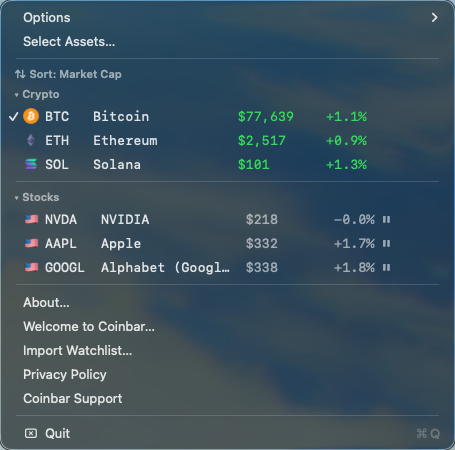
A real screenshot of Coinbar with BTC, ETH, SOL, NVIDIA, Apple, and Alphabet (Google). Prices reflect the moment captured, not live market data.
Ready to make it yours
- A short welcome guide helps you find the app and customize your watchlist.
- New installations start with Bitcoin, Ethereum, Solana, Apple, Alphabet (Google), and NVIDIA.
- Only Bitcoin is pinned initially. Click any asset row to show or hide its price in the menu bar.
- Search for newly listed crypto and stocks across supported markets.
- Keep the last saved stock quotes and coin directory available when offline.
Availability
Coinbar is available now on the Mac App Store. Regional pricing is shown in the store before purchase.
Data and privacy
Crypto data comes from CoinGecko; stock and currency data comes from Yahoo Finance. Quotes may be delayed, rate-limited, or unavailable. Coinbar is a price viewer, not a trading platform or investment advisor.
No Coinbar account is required. Settings stay on your Mac; requests go directly to data providers. Read how data is handled.
Need a hand?
Visit Coinbar support or email hello@arenovo.com.